A few weeks ago, I wrote a post regarding using the SSH module to control a Windows system and the reason why I went so far into depth with that work is because this was a stepping stone into what I wanted to do which was make a collection/repo of Ansible playbooks focused on a LAN-Cafe type scenario.
Regarding the "why", I noticed a significant rise in eSports-focused internet cafes. While internet cafes have existed for decades, these gaming-centric spaces are a growing trend (and I’ve noticed a few popping up in London and Tokyo myself).
And specifically with Windows, I've often found there can be a lot of troubleshooting when it comes to having the perfect gaming experience ready to go. Here's a list of common issues you could potentially have :
- Windows Updates
- Game Updates
- Graphics Drivers being Out of Date(usually not included in Windows or normally super out of date)
- Logging out of Player accounts
While these issues are gaming-specific, there is immense value in automating this work. Managing multiple systems remotely saves a massive amount of time and physical effort.
So in today's' post, I want to focus on making a bunch of Windows gaming focused Ansible playbooks, the few I want to work on today is the following :
- Use Winget to install the game launchers
- Force Windows Updates and Reboots if needed
- Force boot games
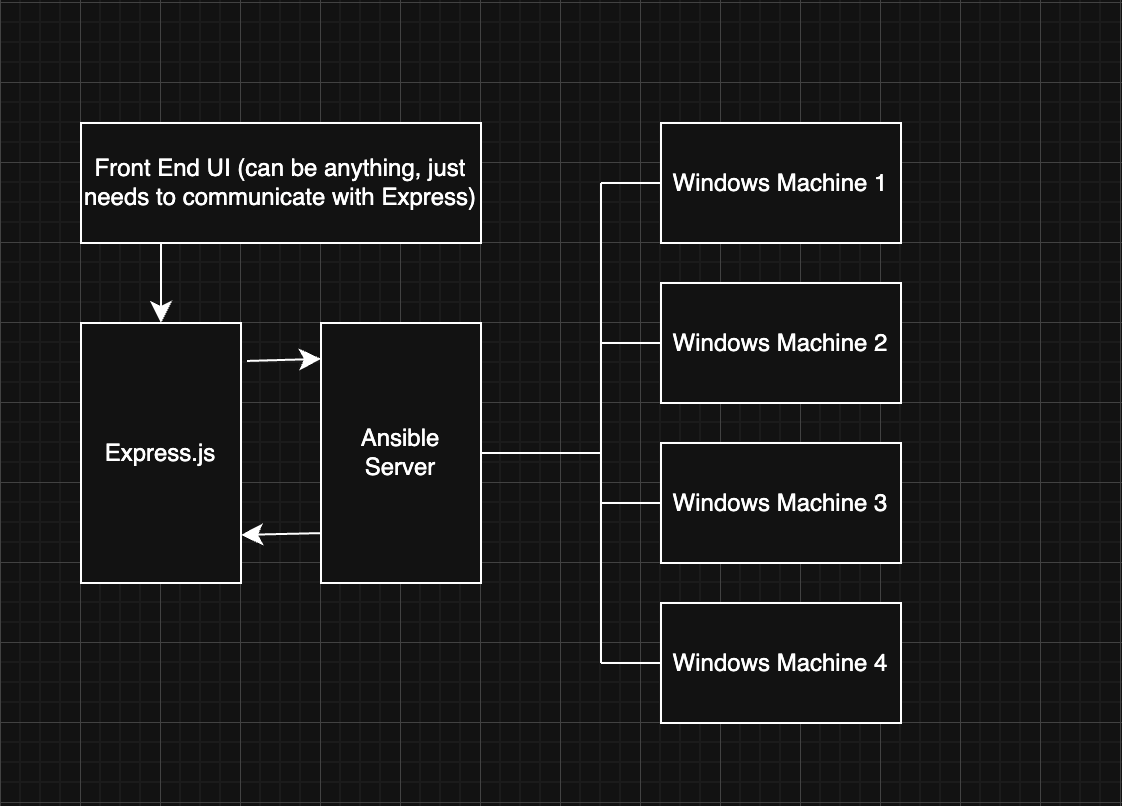
What I'm wanting to do with this project is to lead this work into other parts of a whole suite of tools related to this, or at the very least an Express server that can issue out long-winded Ansible commands to the hosts. Below is a diagram that showcases what I am talking about.
Part 1 : Using Winget to install game launchers
Time to write up the first Ansible playbook, I wanted to focus on is the following scenario :
You need to setup x number of Windows Machine, you need to install all of the major gaming apps. How would that Ansible playbook look?
Now there is some additional complication with this as we need to set up the Windows account, install OpenSSH onto the system we want to manage and put an SSH key here, whilst this is stuff that could be easily bootstrapped, that is out of scope but know that I will address that at some point in the near future.
We are already assuming that the user has the Windows install in the correct place. So, all we need to do is run this playbook which will use winget to simply grab the applications.
---
# This playbook will run a bunch of wingets to install the following gaming apps
# - Steam
# - Epic Games Launcher
# - GOG Galaxy (Optional)
# - Ubisoft Connect (formerly Uplay)
# - EA Desktop

# Note that this playbook will be successfull if reran over

# Will prompt the user that there is a winget install coming up
- name: Install Gaming Apps
  hosts: windows
  gather_facts: no

  tasks:
    # Before Beginning, we need to check for an active internet connection as we will need internet for this
    - name: Check if we have a valid internet connection
      ansible.windows.win_wait_for:
        host: www.google.com
        port: 80
        state: started
        delay: 0
        timeout: 5
    # Using Winshell to do this, other modules don't play nice with ssh windows
    # Search tool for winget stuff : https://winstall.app
    - name: Install game clients
      win_shell: |
        winget install --id {{ item }} --source winget --accept-source-agreements --accept-package-agreements
      loop:
        # Future plans is to have this somewhat configurable, mass installing everything seems to make sense
        - Valve.Steam
        - Valve.SteamCMD # Needed for some extra steam functionality
        - EpicGames.EpicGamesLauncher
        - GOG.Galaxy
        - Ubisoft.Connect
        - ElectronicArts.EADesktop
      register: result
      failed_when:
        - result.rc != 0
        # Will not fail if the package is already installed
        - '"Found an existing package already installed" not in result.stdout'
      changed_when: '"Successfully Installed" in result.stdout'
    - name: Pause for 30 seconds
      ansible.builtin.pause:
        seconds: 30
    # Blizzard Game Install (needs location requirement):
    - name: Install Blizzard.BattleNet (with custom location)
      win_shell: |
        winget install --id Blizzard.BattleNet --location "C:\Program Files\Battle.net" --silent --accept-source-agreements --accept-package-agreements -e --source winget
      register: result
      failed_when:
        - result.rc != 0
        - '"Found an existing package already installed" not in result.stdout'
      changed_when: '"Successfully installed" in result.stdout'
    # Not game clients but things that Gamers would like to have on hand
    - name: Install misc clients
      win_shell: |
        winget install --id {{ item }} --source winget -e --accept-source-agreements --accept-package-agreements
      loop:
        - Google.Chrome
        - Discord.Discord
      register: result
      failed_when:
        - result.rc != 0
        # Will not fail if the package is already installed
        - '"Found an existing package already installed" not in result.stdout'
      changed_when: '"Successfully Installed" in result.stdout'
There are a few things going on in this script that I want to highlight :
- Battle.net (Blizzard's game launcher, needed for World of Warcraft and other Blizzard titles) on Winget appears to not allow an installation without specifying the installation location with
"C:\Program Files\Battle.net", there might be a better way to implement this, but it's done as a separate task for the time being. - We have a task to check if we have an active internet connection, using the
ansible.windows.win_wait_forto simply check if the machine can pingwww.google.com. - We are failing the task if
Found an existing package already installedis not found in the result.stdout. Furthermore, we are reporting the task aschangedif we find aSuccessfully Installedin result.stdout. Besides, we aren't allowing any form of skipping as we want to make sure Winget gets the latest version.
Whilst this is fine for a native setup as Winget is included in most new versions of Windows, I am debating to myself whether to look at a different Windows package manager solution, specifically using something like Chocolatey which may play nicer with Ansible, plus they have a nice search tool for packages.
Despite that concern, I am pretty happy with this setup so far.
Part 2 : Windows and Winget Updates
The next issue I wanted to tackle was forcing update on the machines if necessary, with the potential number of Windows updates a system can get nowadays. It's worth having an Ansible playbook that can do an installation of said updates.
The good news is it's really easy to do thanks to the Ansible modules. And with Winget, you can do a winget upgrade -all in order to get all of Winget packages up to date :
---
- name: Install all updates and reboot as many times as needed
  hosts: windows
  gather_facts: no

  tasks:
    # Install SYSTEM updates, incl Features + Securities
    - name: Install all updates
      ansible.windows.win_updates:
        category_names: "*"
        reboot: true
    # Will run all Winget Updates
    # Note, there is an issue with Battle.net which I might just remove to be honest
    - name: Install Winget Updates
      win_shell: |
        winget upgrade --all --accept-source-agreements --accept-package-agreements --include-unknown
      register: result
There is an issue with this playbook, and it's battle.net being a bit fiddly with winget. I'm debating whether to exclude it from these automation playbooks, but I have a feeling that this is something people would like to have on hand. I will have to do some more digging into this offline.
Part 3 : Launching Steam Games
This was something that I expected to take up not too much time, but I ended up taking a bit more time due to a design decision I made early on.
Specifically, I chose to use SSH based authentication which sounds fine on paper but what I quickly discovered is trying to boot up a Steam application is nearly impossible due to the fact that the SSH session doesn't know what is going on in the GUI. And trying to simply trigger the Steam URI functionality didn't appear to work.
There is a good workaround to this, one that I initially dismissed but with some TLC, I think it's the best idea I've got so far.
---
# This is a bit messier than I'd like due to an issue with SSH Sessions
- name: Boot Up Steam game via AppID
  hosts: windows
  gather_facts: no
  # Defining the stuff here
  vars:
    task_name: LaunchSteamGameTemp # Could do some iterating
    steam_appid: 2280
    steam_uri: "steam://rungameid/{{ steam_appid }}"

  tasks:
    - name: Create scheduled task to launch Steam game
      community.windows.win_scheduled_task:
        name: "{{ task_name }}"
        description: Temporary task to launch Steam game
        actions:
          - path: cmd.exe
            arguments: "/c start {{ steam_uri }}"
        # To make it clear, with the registration flag, will run immedaitely
        triggers:
          - type: registration
        username: "{{ ansible_user }}"
        logon_type: interactive_token
        run_level: highest
        state: present

    - name: Run the scheduled task
      ansible.windows.win_command: schtasks /run /tn "{{ task_name }}"

    # Should make add a wait for the application in question to boot but I'm unsure
    - name: Wait for 30 seconds for game to launch
      ansible.builtin.pause:
        seconds: 30

    - name: Delete scheduled task
      community.windows.win_scheduled_task:
        name: "{{ task_name }}"
        state: absent
This script will do the following :
- Create a scheduled task that contains a cmd.exe command to run the steam application in the specific user session
- Run the task which will in turn boot the game up
- Delete the scheduled task as well after 30 seconds
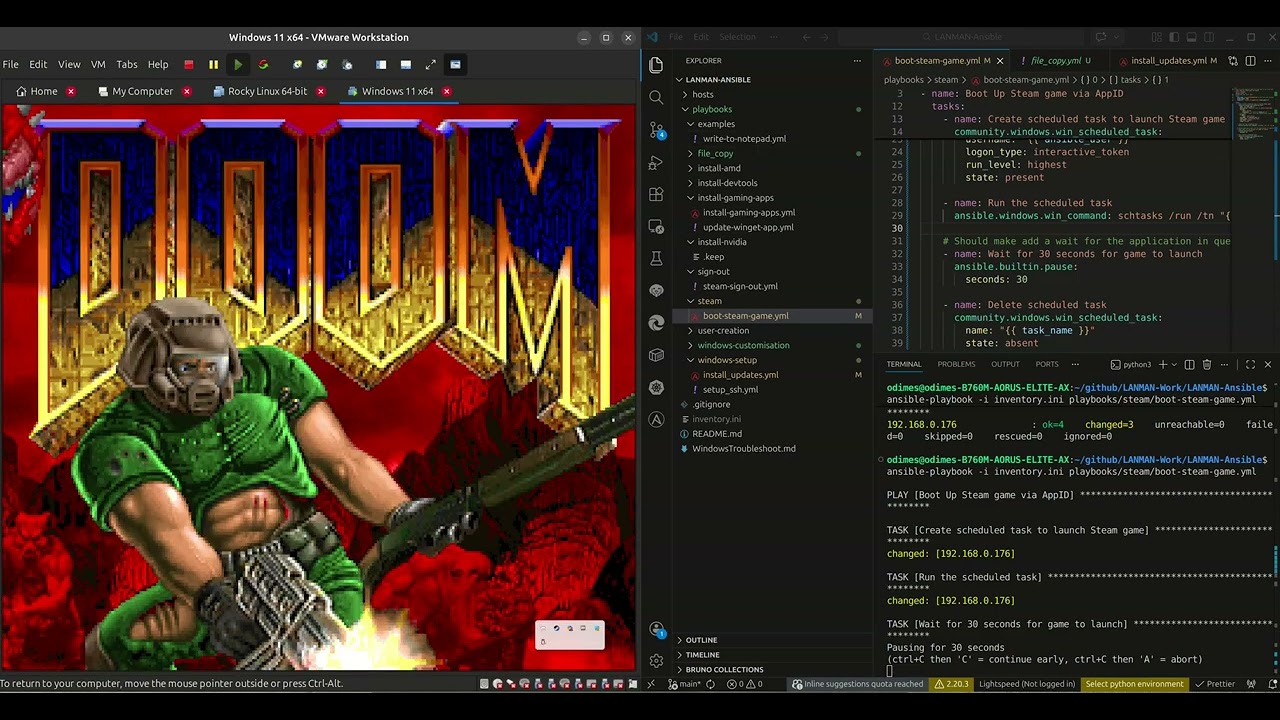
The fact that this is a scheduled task does give us a lot of flexibility as we could do a timer or something along those lines. But this is a good starting point. This does have the additional benefit that if we wanted to run the executable against a different user (aka the user that is logged in). Below is a video demonstration of the above script booting up some DOOM.
What's next?
I have a few more things I'll like to do, specifically do the following :
- Add support for more game launchers - epic games launcher support and others
- Look at Winget alternatives - Chocolatey might be needed.
- More Windows config stuff - change backgrounds and stuff like that
- User config stuff - being able to create new users and stuff
In the next post, I'll make the playbooks public on Github. These playbooks need some additional work and still feel like prototypes and not super consistent. I want to nail them down before giving them out.